Tools

Play it. Mix it. Make it.

The instruments ONEZERØFOUR uses to play, mix and make these releases. They run in your browser, on the same catalogue you have just been listening to.

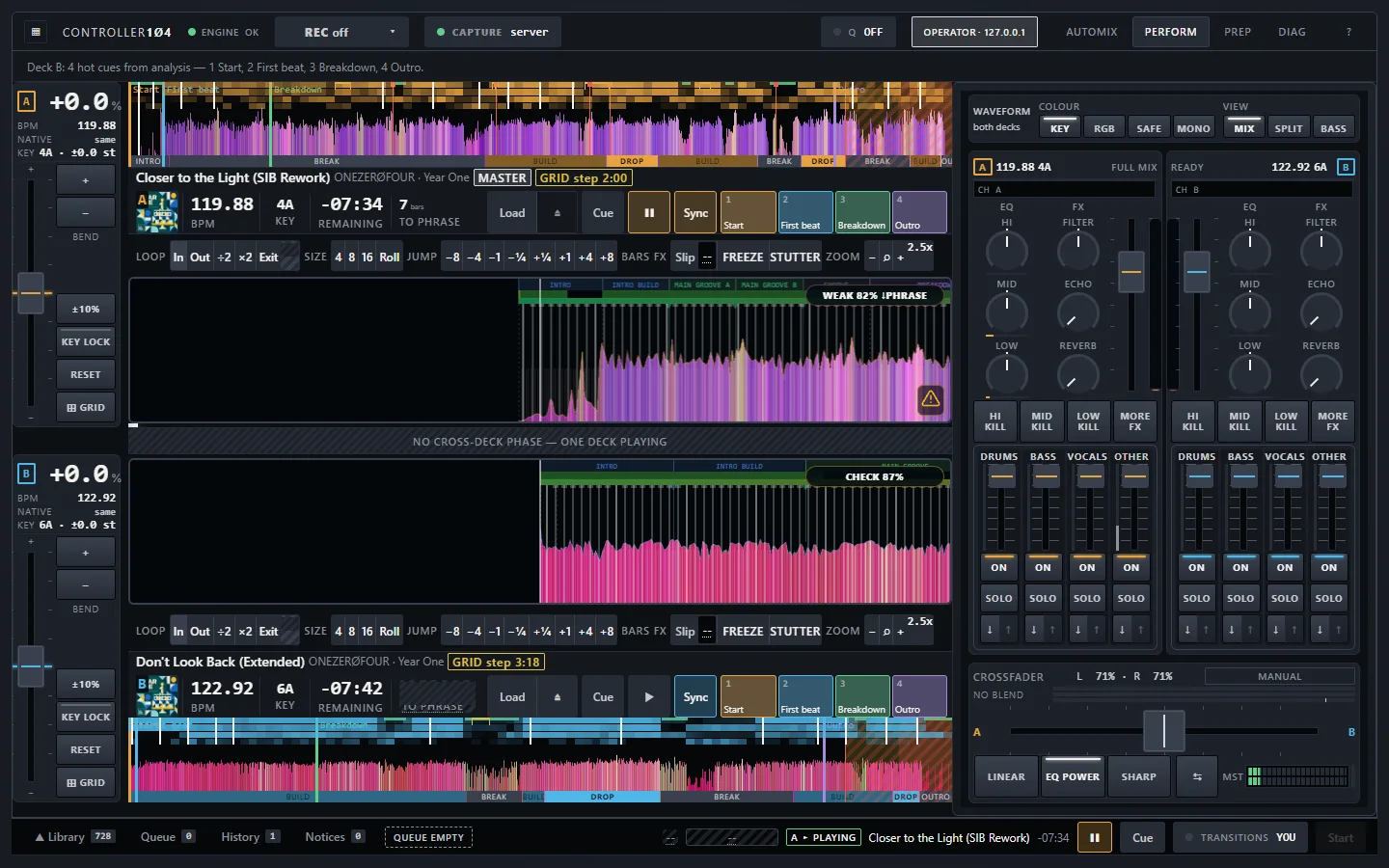
CONTROLLER1Ø4 in PERFORM mode: two decks with waveforms, the mixer and stems

◐ Coming soon · free · no sign-up

CONTROLLER1Ø4

Play a DJ set live, or let the automix play it.

A two-deck DJ mixer that runs in the browser and opens with the whole ONEZERØFOUR catalogue loaded. Play it by hand, or press Auto and let it play a set the way a DJ would.

  1. Open it: the catalogue is already loaded.
  2. Press Auto and let it play a set, or take a deck yourself.
  3. Best on a laptop or desktop, with headphones or speakers.
Coming soon

Two decks and a mixer

  • Three-band EQ with kills, a filter, echo and reverb on each channel
  • Crossfader with linear, equal-power and sharp curves
  • Pitch to ±10 %, key lock, sync to tempo and phase
  • A master meter and a recorder that saves the set with its tracklist

Stems

  • Every track split into drums, bass, vocals and other
  • Mute, solo or ride each stem on either deck
  • Swap one bassline for the other instead of playing two at once
  • Pull a vocal out before the next one comes in

Performance

  • Hot cues set from the analysis: start, first beat, breakdown, outro
  • Loops of 4, 8 and 16 bars, rolls, beat jumps and slip
  • Beat grids checked against each track's kick
  • Waveforms coloured by key or by frequency band, with the song's sections marked

Automix

  • Picks the next track by key, tempo and energy
  • Starts each blend on a phrase, 8 to 32 bars long
  • Keeps one bassline and one vocal at a time
  • Refill keeps a set going for as long as you let it

A closer look
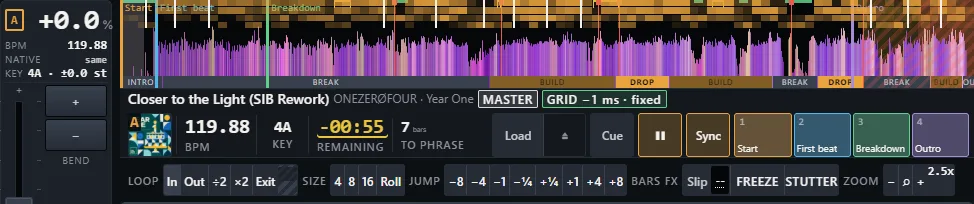
A CONTROLLER1Ø4 deck: the record's overview with its sections, tempo, key, time left, bars to the phrase, the grid badge, loops, jumps and four hot cues

The deck

Each deck keeps a record's facts where a DJ looks for them: tempo, key, time left and the bars to the next phrase, with a badge that says how closely the beat grid sits on the kick. The overview shows the whole record, coloured by key, with its sections marked along the foot: intro, build, drop, break, outro.

Underneath are loops of 4, 8 and 16 beats, jumps from one beat to eight bars, slip, freeze and stutter, and four hot cues already placed from the analysis: start, first beat, breakdown and outro.
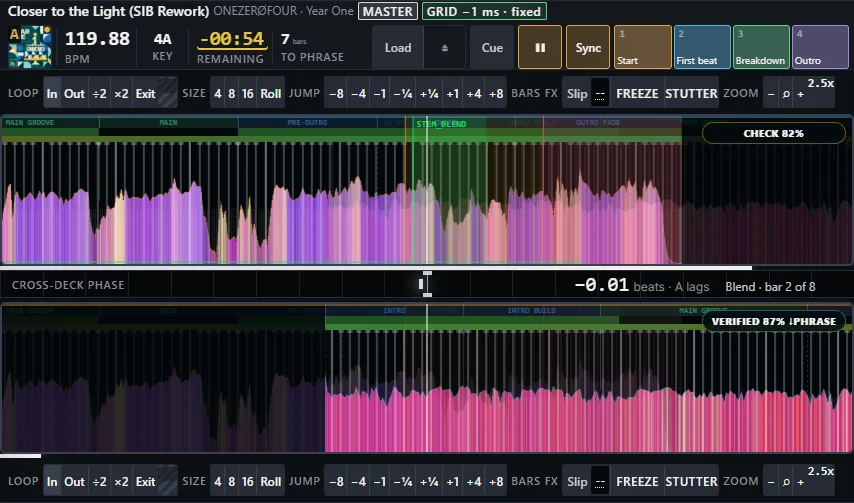
Both decks' zoomed waveforms mid-blend, with beat grids, named sections and the cross-deck phase reading between them

The waveforms

Two zoomed waveforms, one above the other, with the beat grid drawn through each and the record's sections named along the top. The strip between them is the cross-deck phase: how far apart the two kicks are, in beats. Here it reads −0.01, two bars into an eight-bar blend: the kicks land together.

The badge on each lane says whether the grid has been checked against the kick while the record plays, so you can trust what you see before you trust your ears.
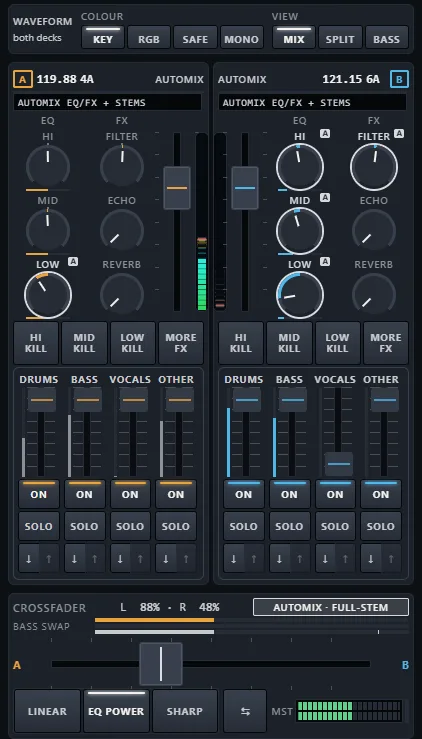
The mixer mid-blend: EQ, filter, echo and reverb on each channel, and the four stem faders moving under the automix

Stems in the mixer

Each channel has a three-band EQ with kills, a filter, echo and reverb, and a fader for each stem: drums, bass, vocals and other.

Mid-blend, as here, the automix rides them. The incoming vocal waits its turn while the outgoing one finishes its line, and the low end is swapped rather than doubled: the outgoing bass comes down as the incoming one rises, so only one bassline plays at a time. The small A marks a control the automix is moving; touch it and it is yours again.
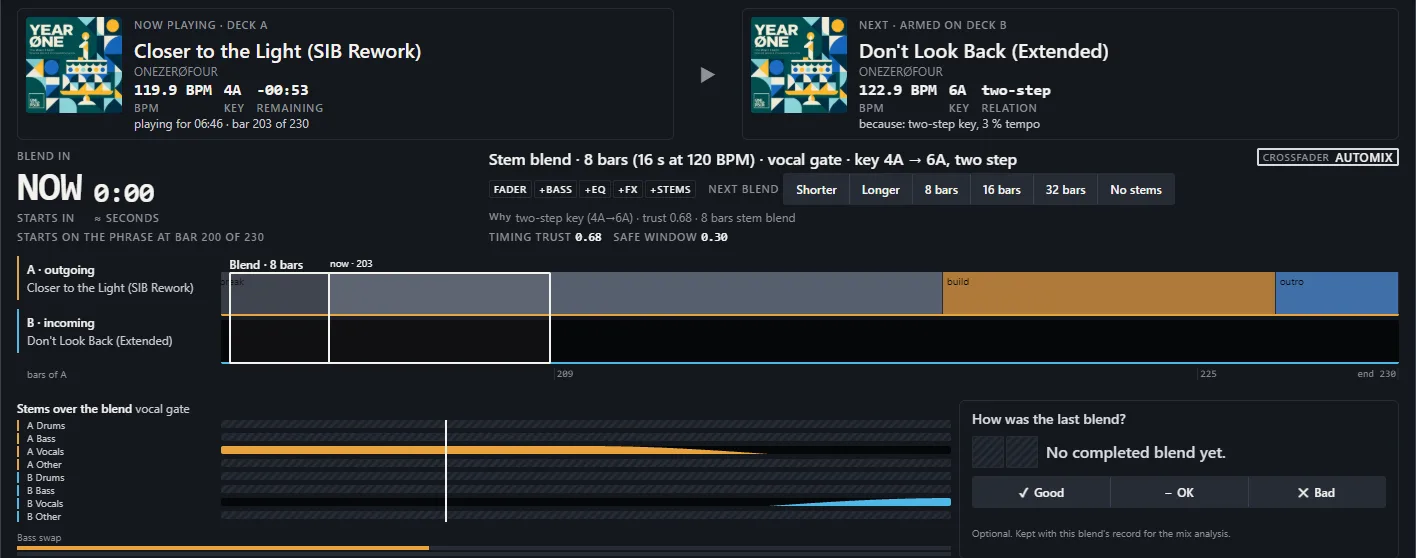
The automix view mid-blend: now playing and next with the reason, the blend's length and start, both records' sections side by side and each stem's level across the blend

Automix

The automix says what is playing, what comes next and why: the key relation and the tempo gap, the kind of blend, its length in bars and the phrase it starts on. Below, both records' sections run side by side with the blend marked, and the stem lanes show which part leaves when.

Shorter, Longer, 8, 16 or 32 bars and No stems change the next blend; Good, OK and Bad keep a note with it for the mix analysis.
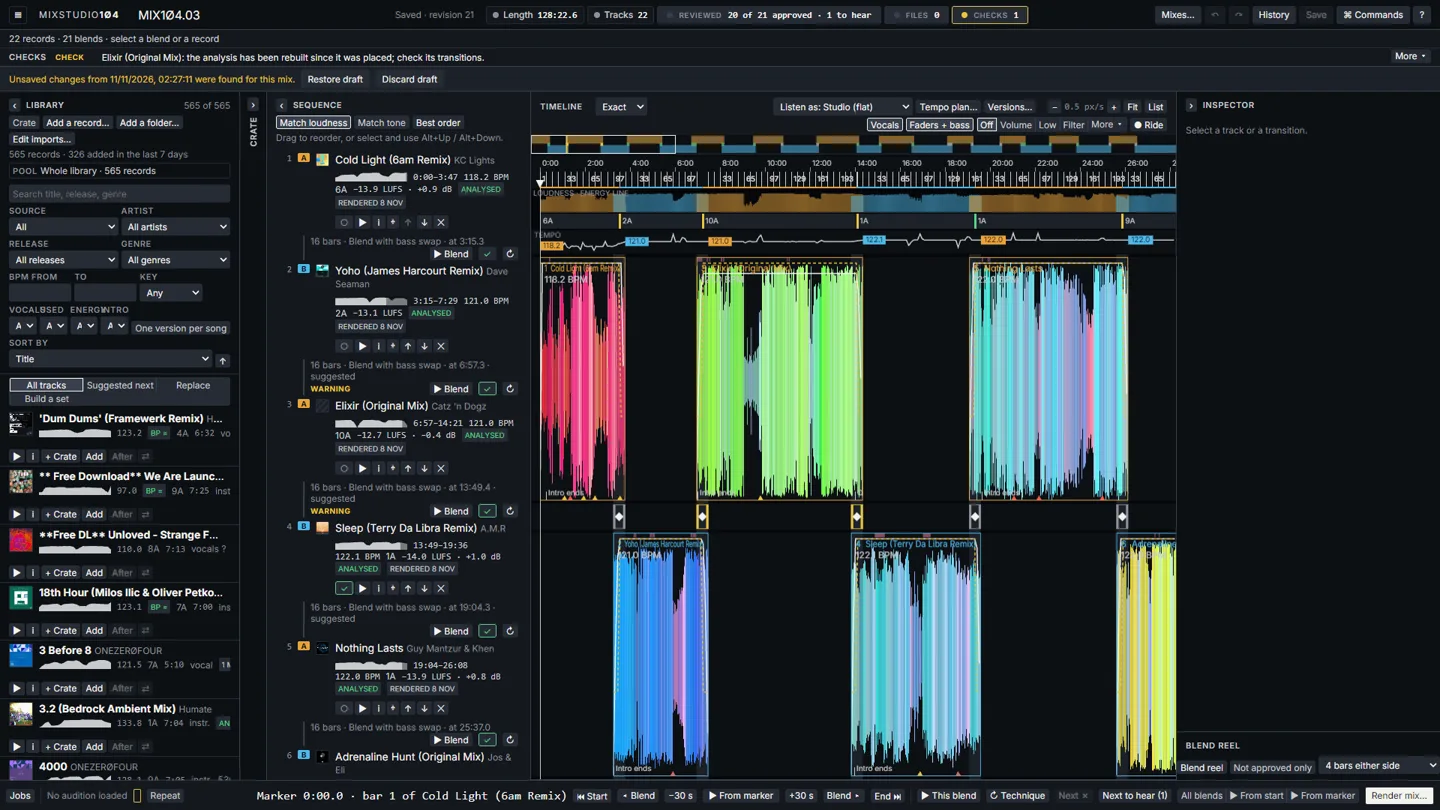
MIXSTUDIO1Ø4 with MIX1Ø4.03 open: the library, the running order and the timeline of blends

○ In development · not yet public

MIXSTUDIO1Ø4

Plan a mix from the library and render it.

Plan a full DJ mix from the library, bar by bar, hear any part of it, then render the finished set.

Not yet public

Choose

  • The whole library, plus your own tracks imported beside it
  • Crates, including smart crates filled by rules
  • Suggested next: the tracks that blend best after this one
  • Build a set to a length and an energy shape

Place

  • Every blend on a timeline, its length and start set to the bar
  • Five blend techniques, with fader, bass, mid, high, filter, echo and reverb curves to drag
  • Loops and jumps inside a track, with grids you can tap in
  • Checks flag clashing keys, two basslines and drifting beats

Hear

  • Play from any point, or just one blend
  • Blend reel: every transition in turn
  • A/B a blend against its other version
  • Listen as: preview the mix on other kinds of system

Finish

  • Render WAV, MP3 and a timed tracklist
  • Match loudness across the tracks, plus a report card
  • Publish pack: Mixcloud, YouTube and X text, cover art, cue sheet
  • Hand the render on as a radio show or a video

A closer look

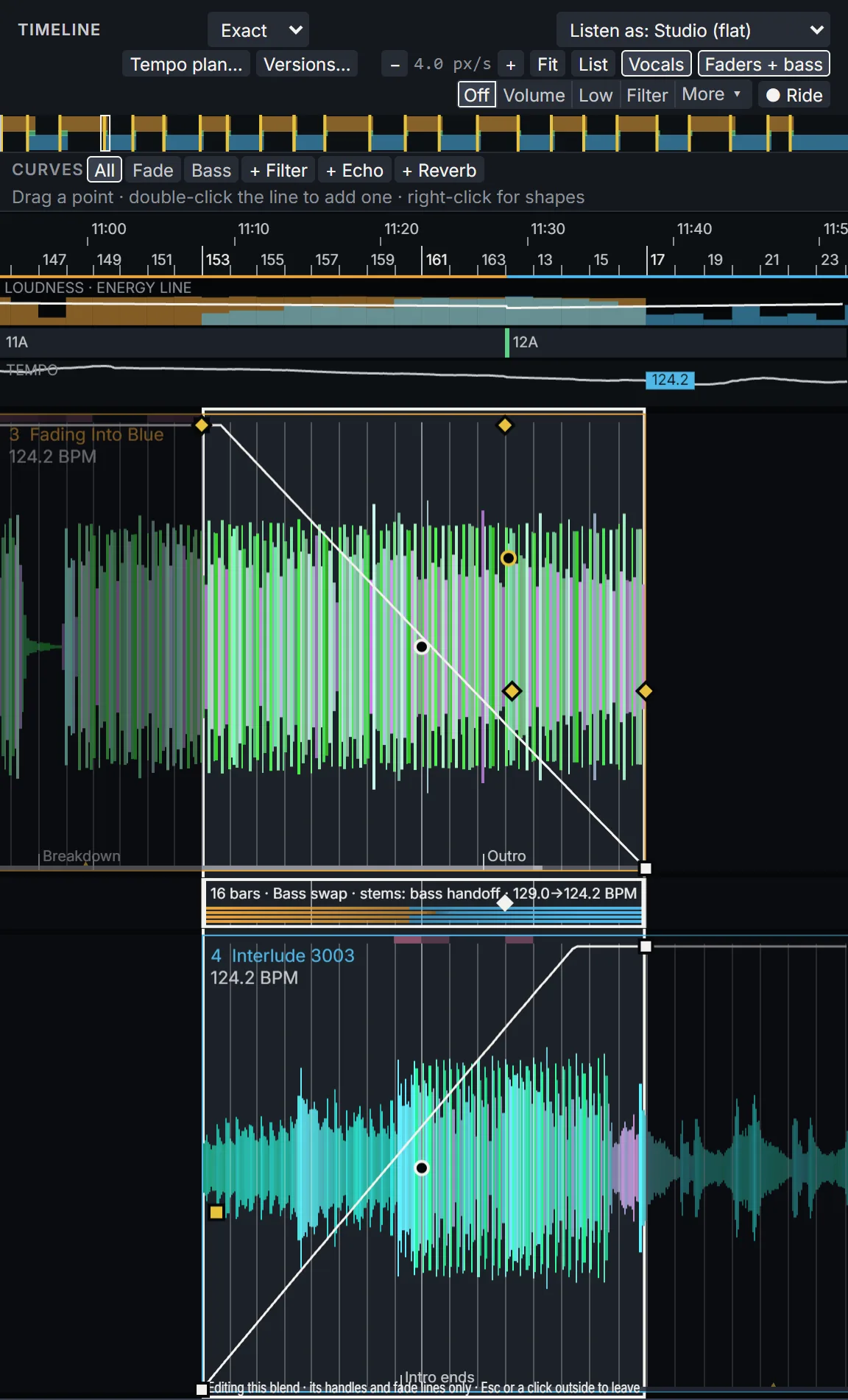
A MIXSTUDIO1Ø4 blend open on the timeline: the fader curves over both records, the blend named between them, and key, tempo and energy above

Blend curves

Every blend sits on the timeline with its curves drawn over both records: the fader, and the bass, mid, high, filter, echo and reverb when the technique uses them. Drag a point, double-click the line to add one, or right-click for a shape.

The bar between the two records names the blend. This one is a 16-bar bass swap with the bass stems handed over, the tempo easing from 129.0 to 124.2 BPM; the strips above show the key, the tempo and the energy line across the mix.

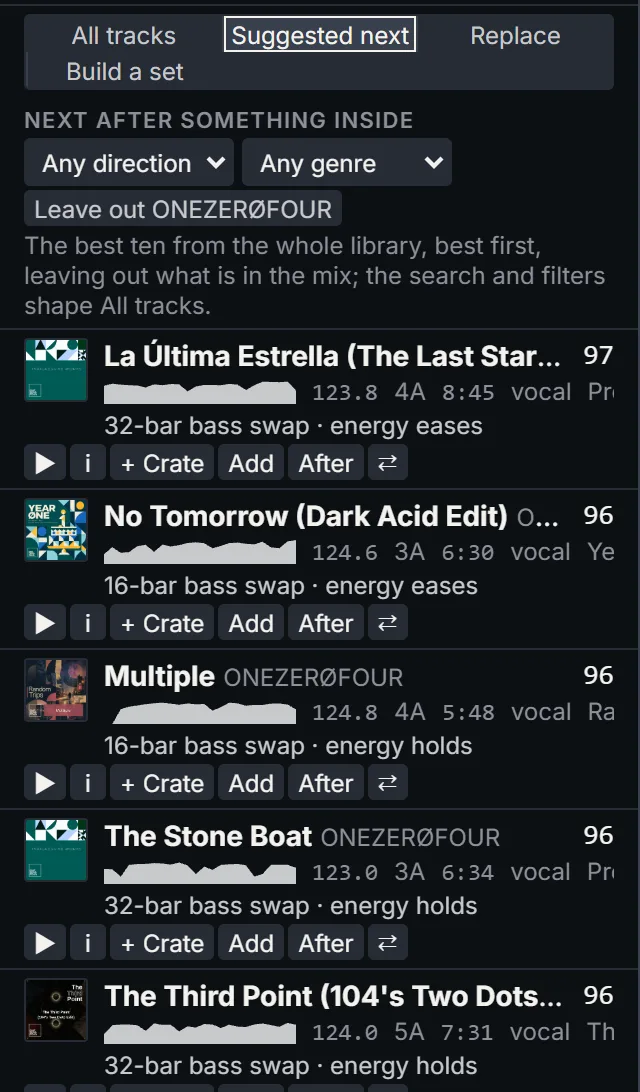
Suggested next in MIXSTUDIO1Ø4: records ranked to follow the selected one, each with its score, the blend it would get and whether the energy holds or eases

Suggested next

Pick a record in the running order and Suggested next ranks the library by how well each record would follow it. The scores come from the controller's own planner, out of 100, with the blend it would play (a 32-bar bass swap, a 16-bar one) and whether the energy holds, lifts or eases.

Narrow it by direction or genre, then play a candidate, add it after the selected record, or drop it into a crate. The same list runs inside a crate, ranking only the records you have gathered.

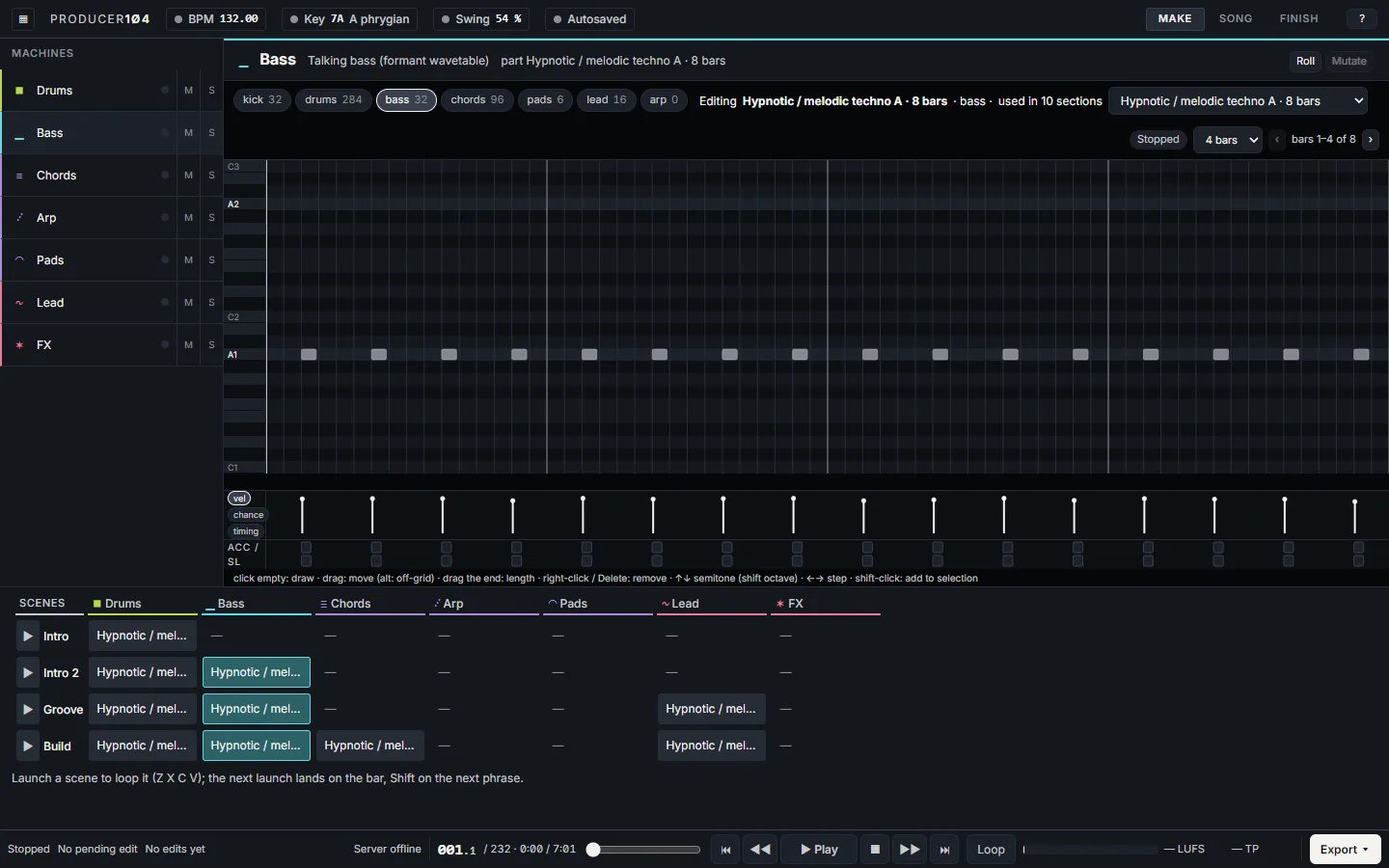
PRODUCER1Ø4 MAKE view: seven parts, a piano roll for the bass and the scenes

○ In development · not yet public

PRODUCER1Ø4

Generate and shape an original track.

Generate an original track in a genre, then steer every part by hand until it is ready to play out, or to load into CONTROLLER1Ø4.

Not yet public

Generate

  • Progressive house, house, breakbeat, techno, trance and UK garage
  • A whole arrangement from one click (G)
  • Key, mode, tempo and swing chosen to suit the genre

Shape

  • Seven parts: drums, bass, chords, arp, pads, lead and FX
  • A piano roll per part, with velocity, chance and timing
  • Mutate a part, or launch scenes on the next bar to hear it live

Arrange

  • Make, Song and Finish views
  • Sections built from scenes: intro, groove, build and on
  • Loudness and true-peak meters as you go

Export

  • WAV at 24-bit/48 kHz or 96 kHz, and stems
  • A Bandcamp pack: WAV plus MP3
  • MIDI and the project file

◐ Private · work in progress

Crate

The digging never really stops.

A browser extension that checks second-hand vinyl listings against the ONEZERØFOUR Discogs wantlist, so a record on the list gets noticed wherever it turns up for sale.

Screenshots taken 2026-11-14 to 2026-11-17 from the working builds.